These Promotion Terms explain how Apex’s promotions, specials and discounts work, including how a Promotional Code is redeemed and what happens if a Booking is cancelled. Please read them together with our Client Terms & Conditions and our Privacy Policy.
1Definitions And Interpretation
1.1In these Promotion Terms, unless the context indicates otherwise, the following words have the meanings given to them below, and cognate expressions have corresponding meanings:
“Apex”, “we”, “us” or “our” means Apex Academic Centre (Pty) Ltd, a private company incorporated in the Republic of South Africa with registration number 2021/689399/07, with its registered office at 346 Jan Smuts Avenue, Craighall, Johannesburg, Gauteng, and its principal operating address at 55 Richards Drive, Halfway House, Midrand, 1685;
“Apex’s Custom LMS” means the online learning and booking platform operated by Apex, known as the MyApex app, through which Lessons are booked, scheduled, delivered, recorded and managed, and through which Apex, Clients, Students and Tutors communicate and exchange Lesson work;
“Client”, “you” or “your” has the meaning given to it in the Client Terms, being the Student where the Student is 18 (eighteen) years of age or older, or, where the Student is under 18, the Parent or other Competent Person who registers the Student;
“Client Terms” means Apex’s Client Terms & Conditions, as amended from time to time;
“Fees” has the meaning given to it in the Client Terms, being the amounts payable by the Client for the Lessons in a Lesson Package;
“Lesson” and “Lesson Package” have the meanings given to them in the Client Terms;
“Promotion” means any promotion, special offer, discount, campaign or reduced price that Apex offers from time to time, whether or not a Promotional Code is used;
“Promotion Period” means the period during which a Promotion is open, as stated in the Schedule for that Promotion;
“Promotional Code” means a code issued by Apex which, when applied in Apex’s Custom LMS, reduces the Fees for a Qualifying Purchase;
“Qualifying Purchase” means a purchase that meets all of the conditions stated in the Schedule for the relevant Promotion, including the services covered, the Promotion Period and any eligibility requirement;
“Schedule” means a schedule to these Promotion Terms setting out the terms of a particular Promotion;
1.2Words defined in the Client Terms have the same meaning in these Promotion Terms unless stated otherwise. Headings are for convenience only and do not affect interpretation. A reference to a Schedule is a reference to a schedule to these Promotion Terms.
3How Promotions Work
3.1Promotions are offered at Apex’s discretion. Apex is not obliged to offer any Promotion, and a Promotion offered once does not entitle any person to the same or a similar Promotion again.
3.2Stated period. Every Promotion runs for a stated Promotion Period. A Promotion is only available while it is open, and closes at the end of the Promotion Period whether or not a Promotional Code is still in a Client’s possession.
3.3Variation and withdrawal. Apex may vary, suspend or withdraw a Promotion at any time. Apex will publish any change on this page or in the Schedule for that Promotion.
3.4Purchases already completed are protected. A variation or withdrawal does not affect a Qualifying Purchase that was already completed and paid for before the change took effect. This mirrors the position on Fee changes in the Client Terms.
3.5Limited application. A Promotion applies only to the services stated in its Schedule. It does not apply to any other service, product or amount.
3.6Not every Promotion uses a code. Some discounts are standing discounts that Apex applies to the Fees directly, without a Promotional Code. Where a discount does not use a Promotional Code, the rules in section 4 about redeeming codes do not apply to it, and the Schedule for that discount states how it is applied.
3.7No cash value. A Promotion and any Promotional Code have no cash value. They cannot be exchanged for cash, credit or any other benefit, and cannot be sold or transferred.
4Redemption Of Promotional Codes
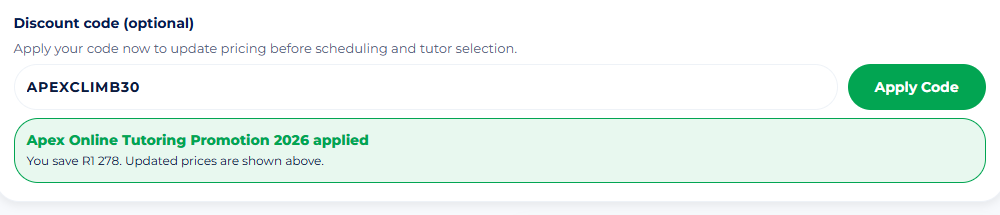
4.1In the app only. A Promotional Code may only be applied in Apex’s Custom LMS, at the checkout step, before payment for the Booking is completed. This is the only way a Promotional Code can be redeemed.
4.2Not applied outside the app. A Promotional Code is not applied to an invoice raised outside Apex’s Custom LMS, to a payment made by electronic funds transfer, or to any payment or billing arrangement made outside the app.
4.3No application after payment. A Promotional Code cannot be applied once payment has been completed. Apex does not apply a discount retrospectively, does not re-issue an invoice at a reduced amount, and does not refund the value of a Promotional Code that was not applied at checkout.
4.4Quoting a code creates no entitlement. Sending, quoting or referring to a Promotional Code in an email, a message, a telephone call or any other communication does not apply the code and does not create any entitlement to a discount.
4.5If the app prevents redemption. If a Client holds a valid Promotional Code and Apex’s Custom LMS prevents the Client from applying it, the Client should contact Apex at support@apexacademiccentre.co.za before making payment, and Apex may assist. Apex is not obliged to apply a discount where payment has already been made.
4.6One redemption per Client. Unless the Schedule states otherwise, a Promotional Code may be redeemed once per Client.
4.7One code per Booking. Only one Promotional Code may be applied to a Booking. Promotional Codes cannot be combined with one another.
4.8Personal to the Client. A Promotional Code is issued to a particular Client and is for that Client’s use. It may not be sold, published, shared publicly or transferred to another person.
8Cancellation, Refunds And Changes
8.1Refunds are based on what was paid. Where a Client is entitled to a refund in respect of a Qualifying Purchase, the refund is calculated on the amount the Client actually paid after the discount was applied. It is not calculated on the price before the discount.
8.2The discount itself is not refunded. The value of a discount is not refunded, credited or paid out in any form, and is not transferred to another Booking, Student or person.
8.3The Client Terms continue to apply. The cooling-off, cancellation and refund provisions of the Client Terms apply to a Qualifying Purchase in the ordinary way, including the electronic cooling-off right, the Lesson Package cooling-off right, the reasonable cancellation fee contemplated by section 17 of the Consumer Protection Act 68 of 2008 and any administrative charge, each calculated on the amount actually paid.
8.4Statutory rights are not affected. Nothing in these Promotion Terms limits any right the Client has under the Consumer Protection Act 68 of 2008 or the Electronic Communications and Transactions Act 25 of 2002.
8.5Changes to a Booking. Where a Booking is changed after purchase, the discount is not recalculated or applied again. If a change increases the Fees, the additional amount is payable at the standard price unless the Promotion is still open and the change qualifies in its own right.
S1Schedule 1: The Climb (APEXCLIMB30)
S1.1Promotion name. The Climb.
S1.2Promotional Code. APEXCLIMB30.
S1.3What it gives. 30% (thirty percent) off the price of a qualifying online tutoring Lesson Package.
S1.4Total saving by Lesson Package. Apex’s Lesson Package prices already include a discount off the standard per-session rate, which increases with the size of the package. Combined with this Promotion, the total saving is 30% on Basic, 31% on Premium, 32% on Advanced, 33% on Elite, 34% on Apex, 35% on Super and 36% on Mega. Percentages do not simply add together, because each discount applies to the reduced price. The amount shown in Apex’s Custom LMS once the Promotional Code has been applied is the amount payable.
S1.5Session Selection. Where the Client books using Session Selection rather than a named Lesson Package, this Promotion applies to bookings of 4 (four) sessions or more.
S1.6Promotion Period. From 1 August 2026 to 31 October 2026, both days included. The Promotion closes at the end of 31 October 2026.
S1.7Services covered. Online tutoring Lesson Packages only. The Promotion does not apply to in person tutoring.
S1.8Who may redeem. A Client who received the Promotional Code from Apex, on one Booking, once per Client.
S1.9How to redeem. Apply the Promotional Code in Apex’s Custom LMS at the checkout step, before completing payment, as set out in section 4.